On a renewal with BT, Virgin Media or TalkTalk? Send us your current setup and we'll review what you have, what you pay, and where we can simplify. Free infrastructure review →
Home › Business Phone Systems › Auto Attendant
Auto Attendant · Included with our systems

"Press 1 for sales" — done properly.

A professional menu that routes every caller right first time, with business-hours logic and a human always reachable.

Two options beat seven.
We design menus callers actually finish.

Phone system design

Review my current setup

Tell us how many people, how many sites and what frustrates you about the current system. A UK engineer designs the call flow, picks the handsets and quotes it, with your numbers ported.

What do you need help with? (optional · pick any)

No hard sell·2-hour response, Mon–Fri·01902 427 427

Free review Tailored to you No obligation
UK
Based & managed
1
Bill & UK team
7
Day install
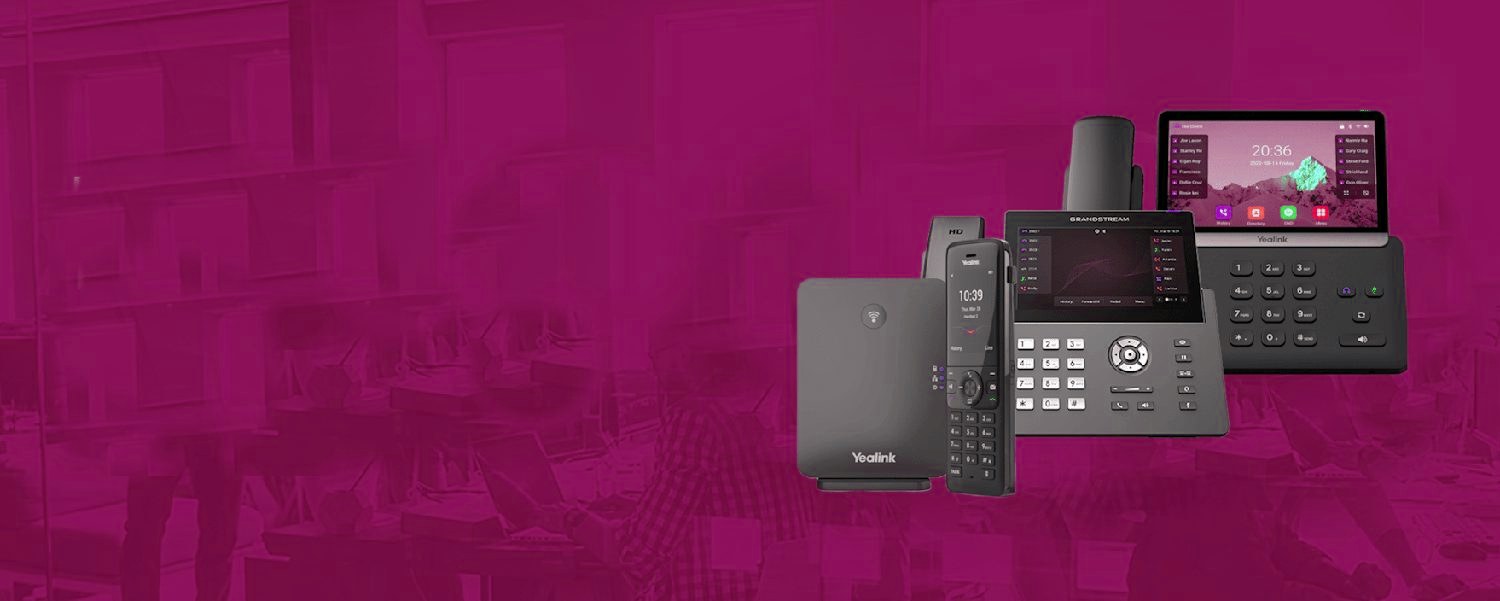
Telexico handsets: Yealink and Grandstream desk phones, DECT and touch-screen models
The handsetsYealink and Grandstream desk phones, DECT and touch-screen models, pre-provisioned by Telexico and shipped ready to plug in.
What happens on a call

From the first ring to the recording.

The same cloud phone system routes every call the way your business works, then keeps a record of it.

A customer callsYour existing number, ported acrossLandline, mobile or a tracked campaign number
Auto attendant“Press 1 for sales, 2 for support”Opening hours, holidays and overflow rules
Ring group or queueRings the right people in the right orderPosition announcements and music on hold
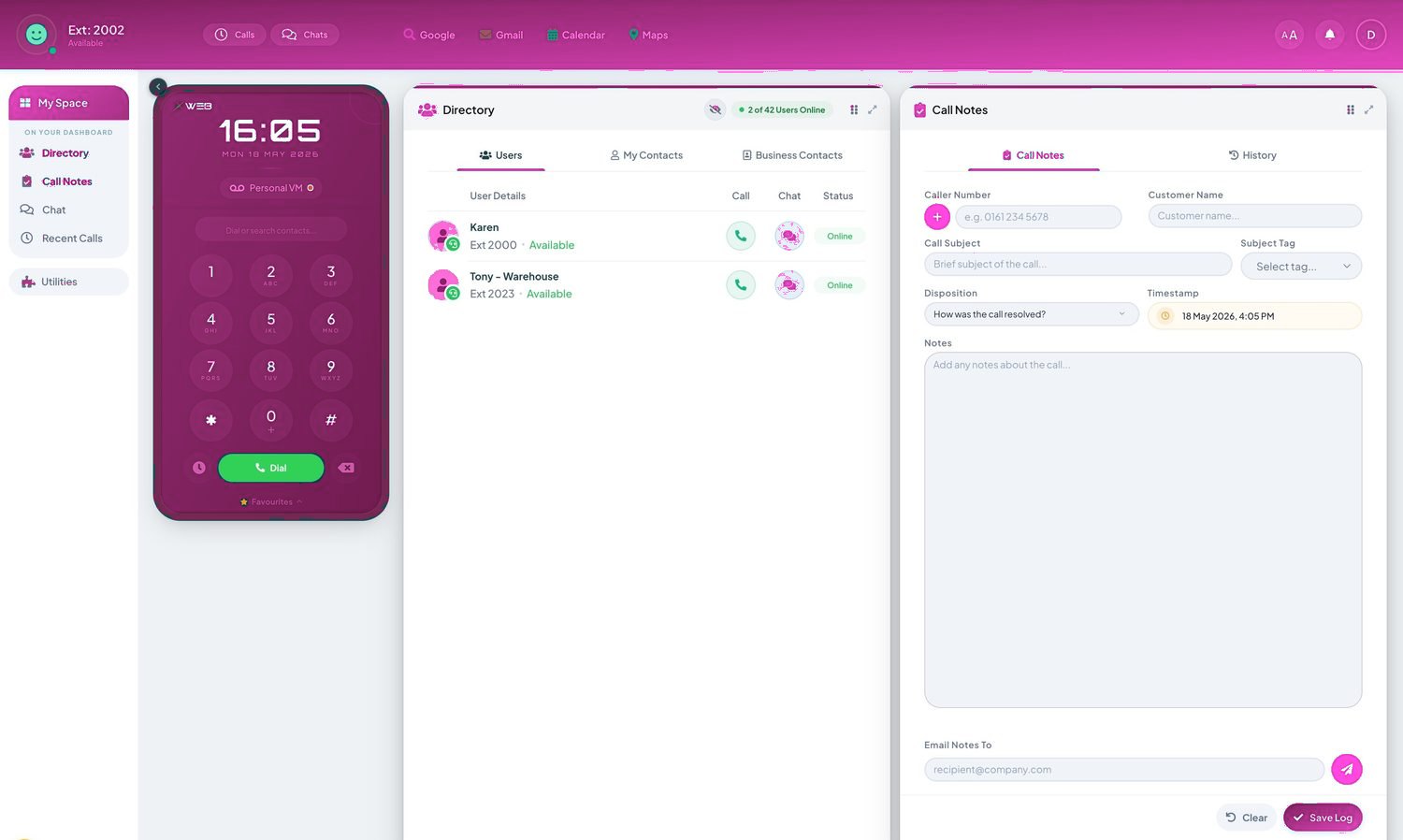
Answered anywhereDesk phone: Yealink or Grandstream, pre-provisionedTelexico Mobile App: your extension on your mobileTelexico Web UC: the phone in a browser tab
Nothing lostUnanswered calls go to voicemail-to-emailEvery call recorded and searchable, with a CRM screen-pop

Professional first impression

Every call is answered immediately with a branded greeting — even at 8am, lunchtime or 6pm.

Callers reach the right person

Menu options route sales, support and accounts straight to the right team, cutting transfers.

Different menus by time of day

Office hours, evenings, weekends and bank holidays can each play the right greeting and routing.

Fewer missed and mishandled calls

Overflow rules send unanswered options to mobiles, voicemail-to-email or your AI receptionist.

Menu design: where auto attendants are won and lost

The difference between an auto attendant that helps and one that infuriates is almost entirely in the design, and the rules are short. Three options is the ceiling for most businesses — by option four, callers have forgotten option one. Put the most-chosen destination first, because a majority of callers press the first plausible thing they hear. Say the department before the number ("for sales, press one") — reversed, callers must hold the number in memory while parsing what it was for. And keep the greeting under ten seconds. Every second of preamble is multiplied across every call you'll ever receive; "thank you for calling" is polite, a paragraph about your company values is a hold-music review waiting to happen.

The details that separate professionals from amateurs: always give the zero-out. Callers who don't fit your menu need "or press zero to speak to someone", and it should genuinely ring a human — a zero option that loops back to the menu is how businesses end up in one-star reviews. Behave differently out of hours: an attendant offering "press one for sales" at 11pm, followed by ringing an empty desk, tells callers nobody thought about them. Time conditions should hand evenings to voicemail, an AI receptionist, or an honest closed message with your hours. And if callers might ever need you urgently — tenants, patients, contract clients — emergency routing behind a menu option beats an emergency mobile number taped to someone's monitor.

Now the honest part: some businesses shouldn't use one at all. If you're five people and every caller wants "whoever picks up", a menu is theatre — a hunt group ringing everyone at once serves callers faster and sounds smaller in a good way. The attendant earns its place when callers genuinely split into distinct destinations — sales versus support, bookings versus enquiries, English versus another language — or when you need calls sorted before they hit busy people. If a provider proposes an IVR tree to a four-person firm, they're selling features, not solving problems. On our quotes, the recommendation follows the call pattern, and we've talked plenty of customers out of menus they didn't need.

Telexico, in use

Every seat, fully loaded.

  • Call recording, the Telexico Mobile App and Telexico Web UC included
  • Handsets pre-provisioned and shipped ready to plug in
  • Moves, adds and changes from the portal, no engineer visit
Get my free review
Telexico Web UC: keypad, directory and call notes in the browser

Every seat, fully loaded.

Frequently asked questions

Do callers hate phone menus?

Only bad ones. A short, clear menu (two or three options) gets callers to the right person faster than a busy human switchboard — and you can always offer 'or hold for the team'.

Can we record our own greetings?

Yes — record your own, use our professional voiceover, or generate natural text-to-speech. Change it whenever you like.

Can the menu change out of hours?

Yes. Time conditions switch greetings and routing automatically for evenings, weekends and holidays.

Is an auto attendant included or extra?

Included with Telexico cloud phone systems — it's a core feature, not a bolt-on.

Want auto attendant on your phones?

It's included with Telexico cloud phone systems — we'll set it up around how your business works.
Telexico Audio Studio

Broadcast-quality phone audio, without the studio.

A complete text-to-speech and music-on-hold studio built into your Telexico portal. Write the script, pick a voice, choose the music, and the same studio publishes straight to your auto attendant, your music on hold and your voicemail greeting. No voice agency, no studio fees, no waiting.

Dozens of natural voices

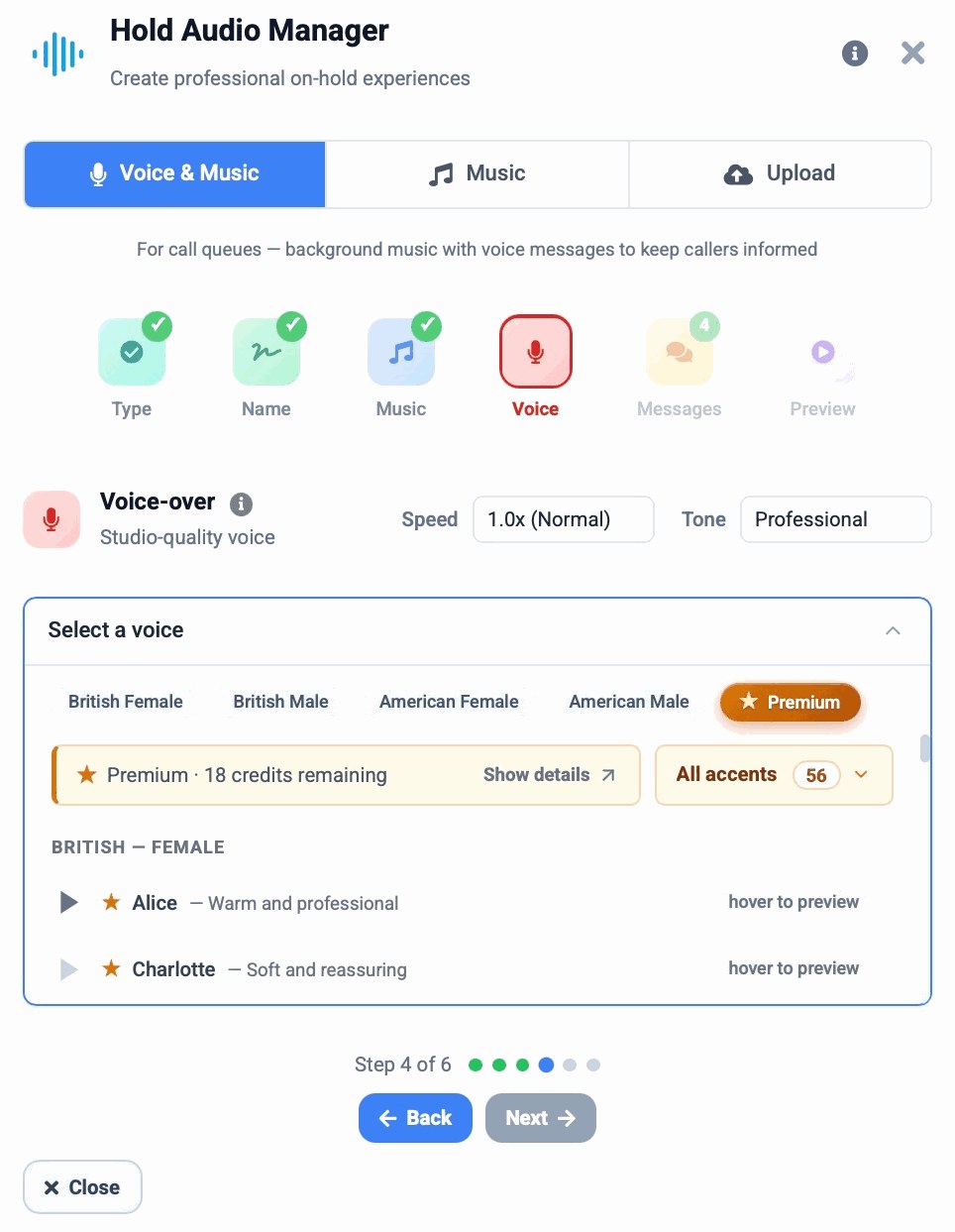
British and American, male and female, plus a premium tier with 56 accents. Set the speed from slow and reassuring to brisk, pick a tone from professional to warm to friendly, and hover to preview any voice before you commit.

A royalty-free music library

Curated tracks by mood: Corporate, Ambient, Jazz, Classical and Upbeat. Every track is licensed and cleared, so there is nothing to worry about and nothing extra to pay. Or upload your own audio.

Music ducking, automatically

The music fades down as a voice-over begins and lifts again afterwards, with no audio editing. Mix voice and music, or use either on its own.

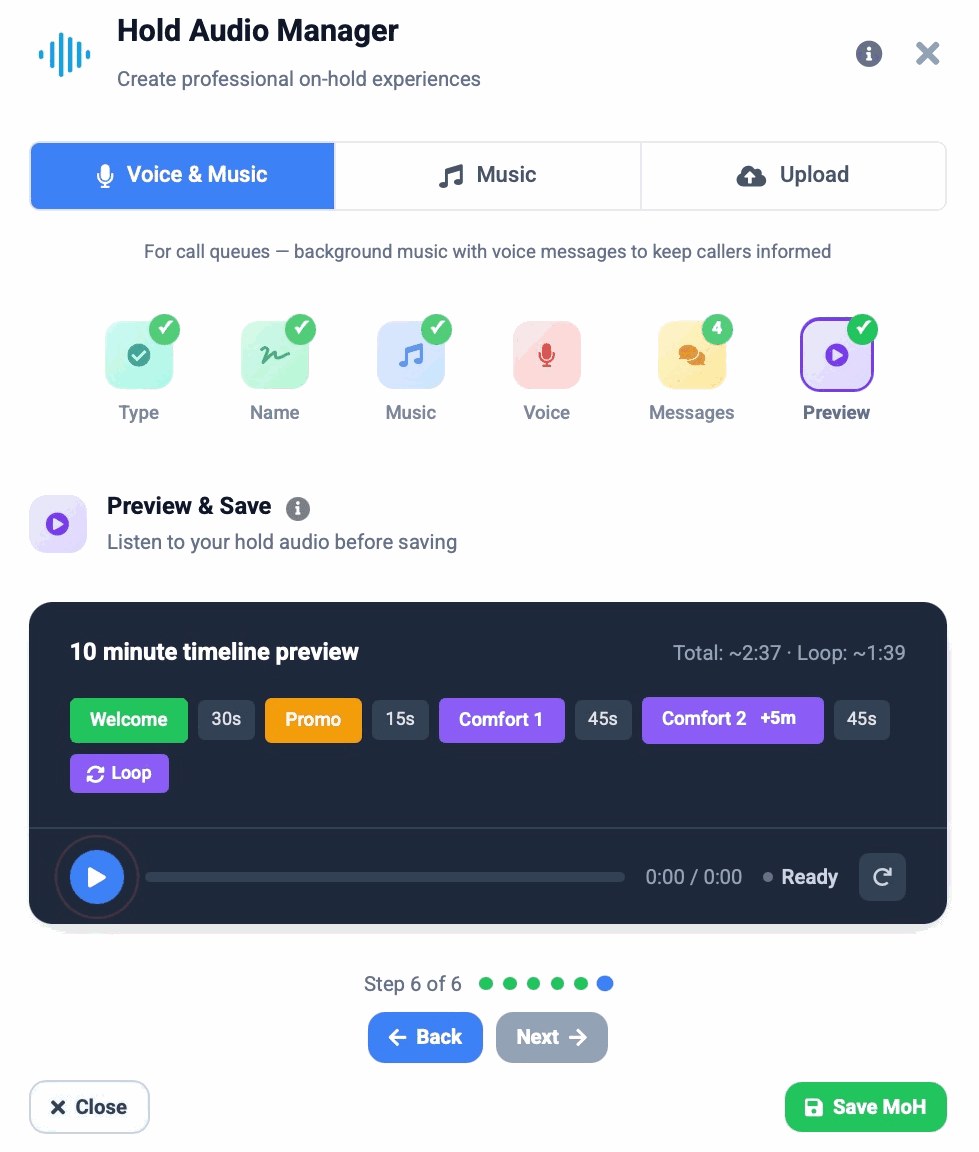
A 10-minute hold timeline

Sequence a welcome message, promotional announcements and comfort messages with custom gaps on a visual timeline, and set a looping comfort message so a long hold never feels dead.

Quick templates, live preview

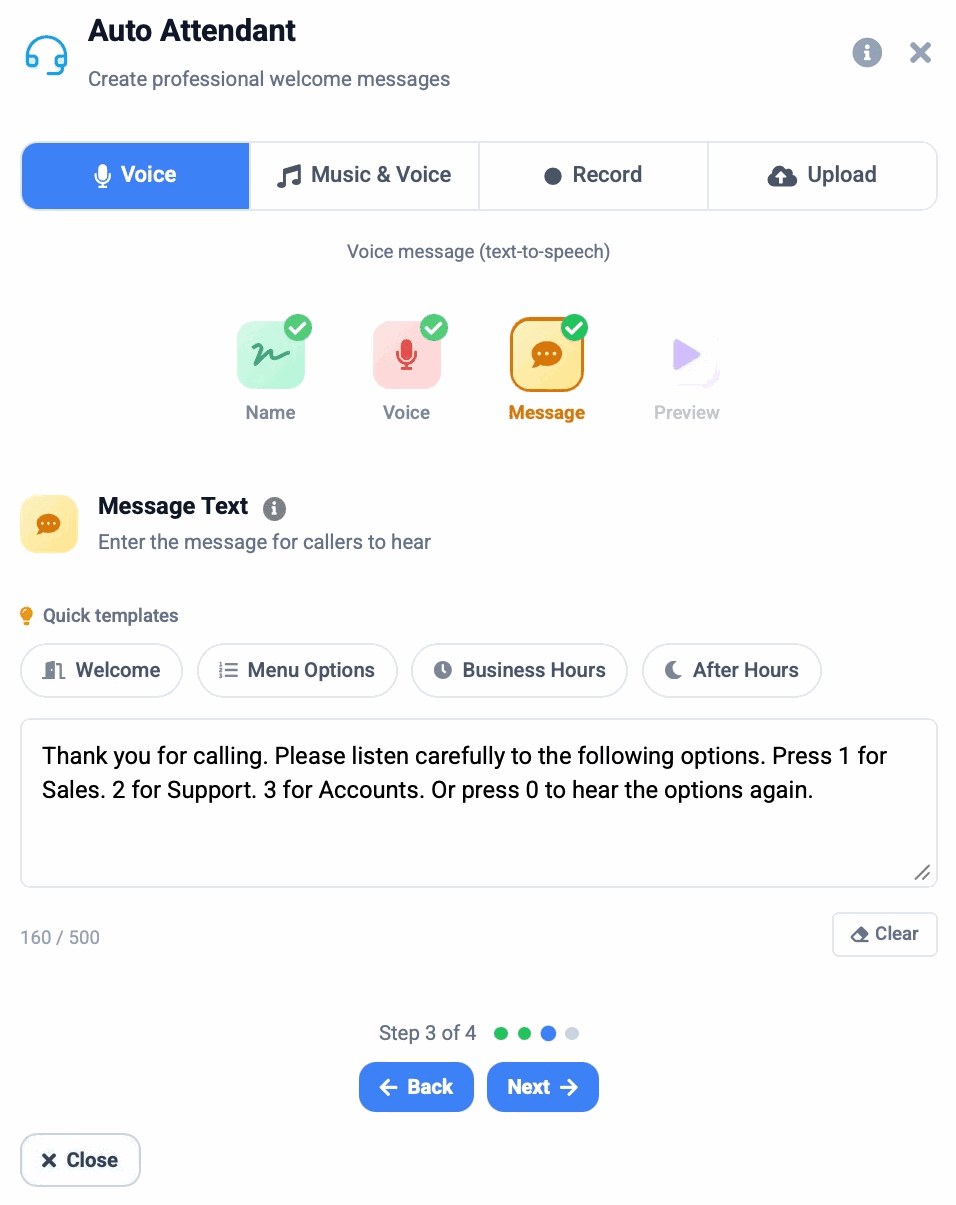
Start an auto attendant from a Welcome, Menu Options, Business Hours or After Hours template, edit the script with a live character count, listen on the built-in player, then save it live with one click.

Your own voice, if you prefer

Record in the browser or upload a file for any prompt, greeting or hold message, and swap between generated and recorded audio whenever you like.

Telexico Audio Studio: choosing a voice with speed and tone controls and a premium accent tier
Voice, speed and tone
Telexico Audio Studio: the 10-minute hold timeline with welcome, promo and looping comfort messages
The hold timeline
Telexico Audio Studio: auto attendant script with quick templates and a live character count
Auto attendant from a template

Changes for a sale, a bank holiday or a new menu go live the same day. One consistent, branded voice across greetings, hold and voicemail makes a small business sound established, and promotional hold messages quietly sell to a captive, already-interested audience.

Chat on WhatsApp
Want help finding the right setup?
Tell us what you need — we’ll call you back within the hour.