Every call, written down. Finally searchable.
Your phone calls hold the truth about your business — the complaint nobody logged, the product you don’t stock, the deal that slipped away. Telexico AI Call Transcription turns every call on your Telexico cloud phone system into a speaker-labelled, searchable transcript with a plain-English summary — and emails you the moment a word you care about is spoken. Nothing to install. Up to 2 months free on your own calls.
Real screens from the Telexico portal, demo account.
Every call written down, the important ones flagged.
From the recording to the alert in your inbox: this is the sequence the platform runs on every call.
Watch one call go through the system.
Five screens from the Telexico portal, in the order the system produces them: the recording, the transcript, the summary, the alert that was listening, and the email it sent. Demo account, real product.
 123
123- 1A transcript icon beside every recorded call
- 2The recording stays the source of truth
- 3Outbound and inbound, every extension you cover
The call is recorded
Your Telexico phone system already records the extensions you choose. Each recording sits in your portal under Call Records → Call Recordings, with a transcript icon beside it. Nothing to install; we switch transcription on per extension.
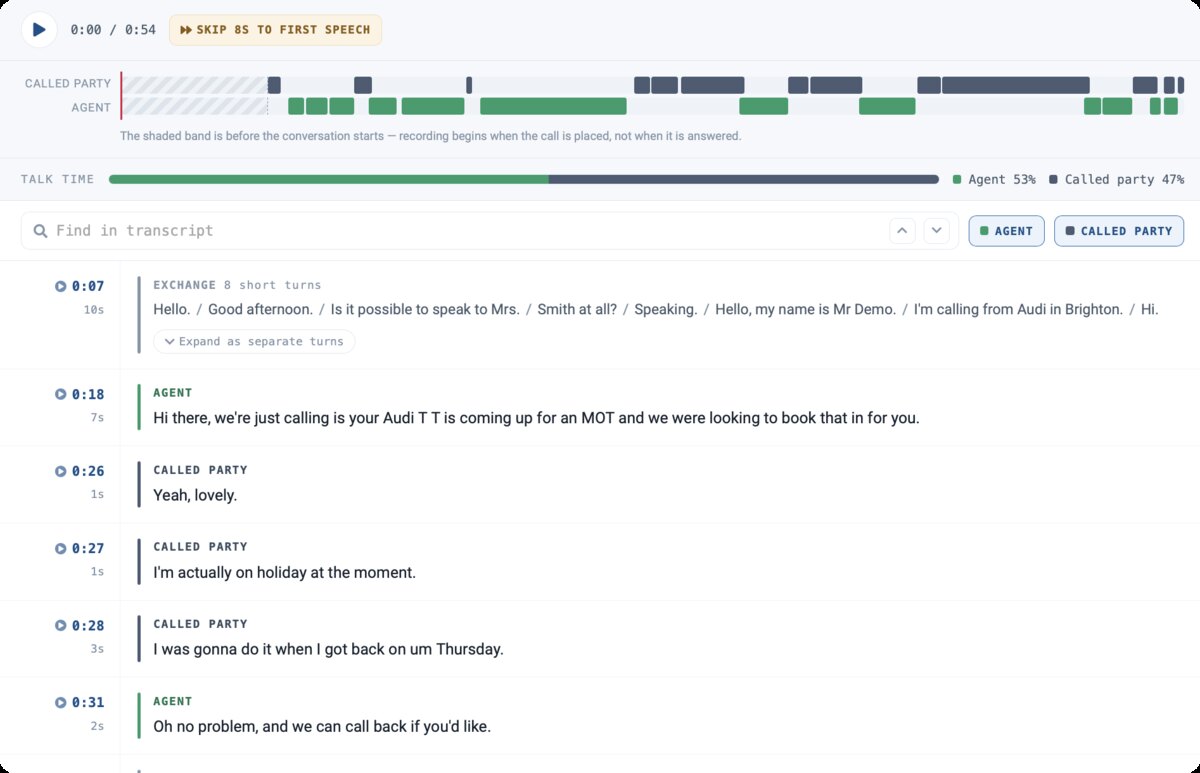
1234- 1Speaker timeline: who spoke, and when
- 2Talk-time split, agent against called party
- 3Find any word inside the call
- 4Click a timestamp to hear that moment
Transcribed, speaker by speaker
Minutes after the call ends, the transcript is there: agent and called party on separate lines, every turn timestamped. Click a timestamp to hear that exact moment; the speaker timeline and talk-time split show how the conversation went before you read a word.
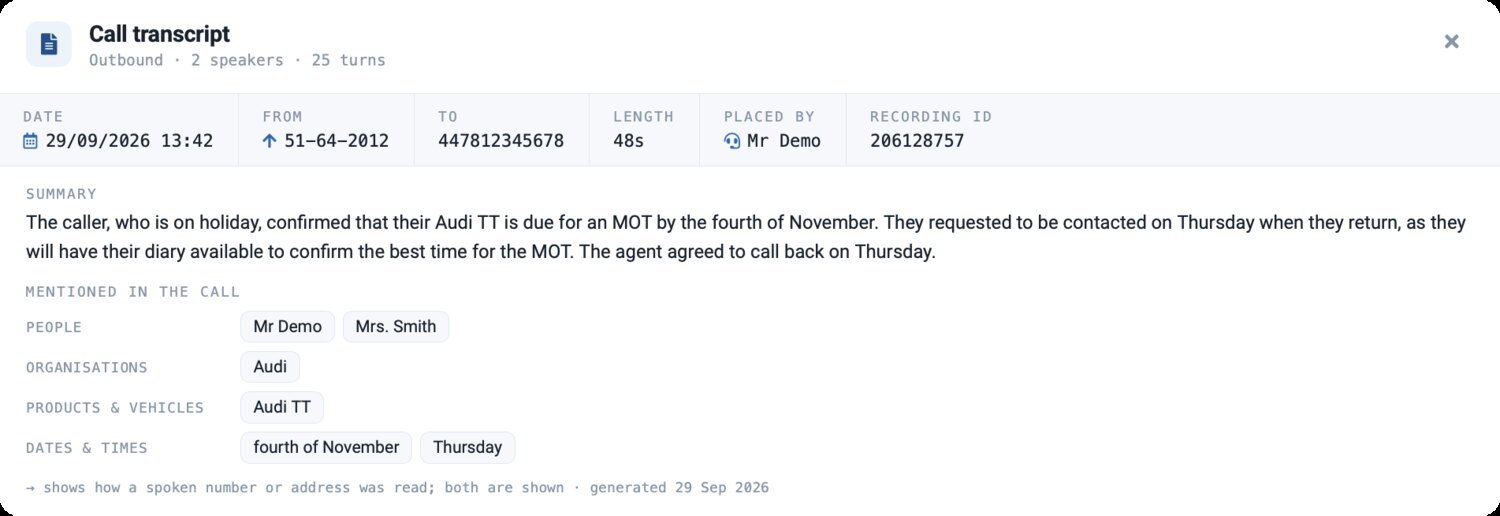
123- 1The gist, in plain English
- 2People, organisations, products and dates as tags
- 3Clearly marked as AI-generated, with the date
Summarised, with the details pulled out
The transcript opens with a few lines capturing the gist, and the details that matter are lifted out automatically: the people and organisations named, the products and vehicles discussed, the dates and times agreed. A manager reads a day of calls instead of listening to them.
 1234
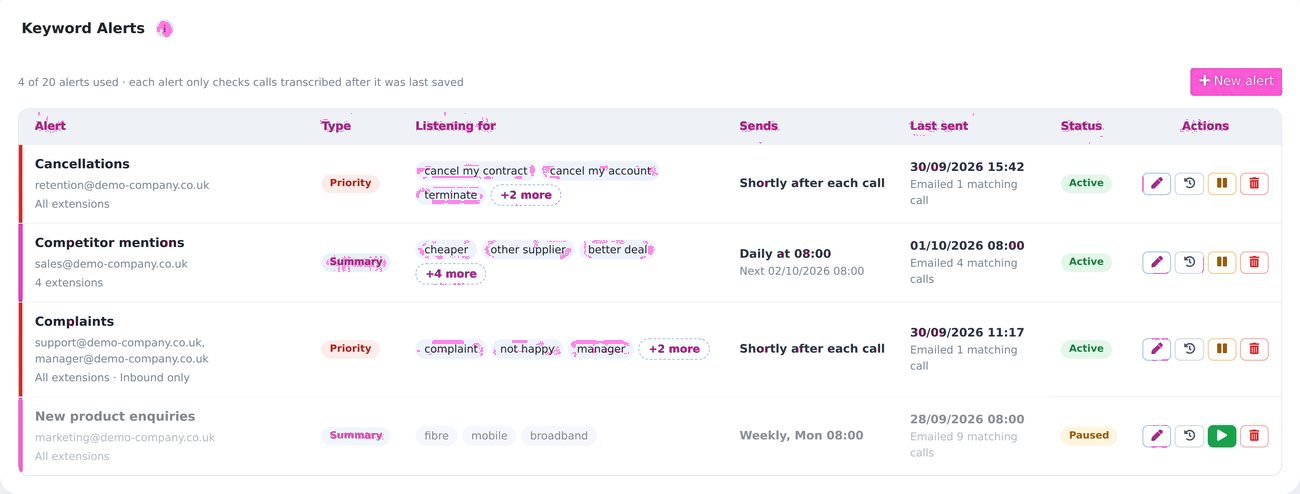
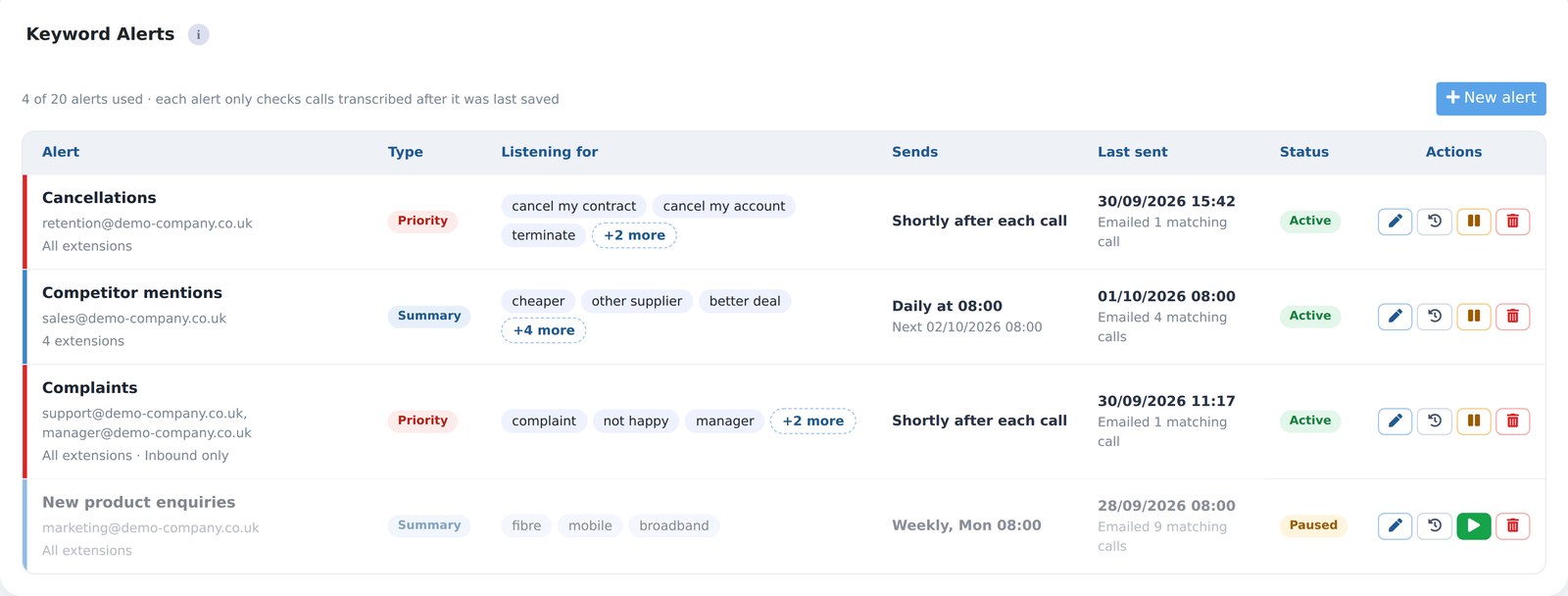
1234- 1Priority: emailed shortly after each matching call
- 2Summary: a digest daily, weekly or monthly
- 3The words and phrases it listens for
- 4Twenty alerts per account
Your alerts are listening
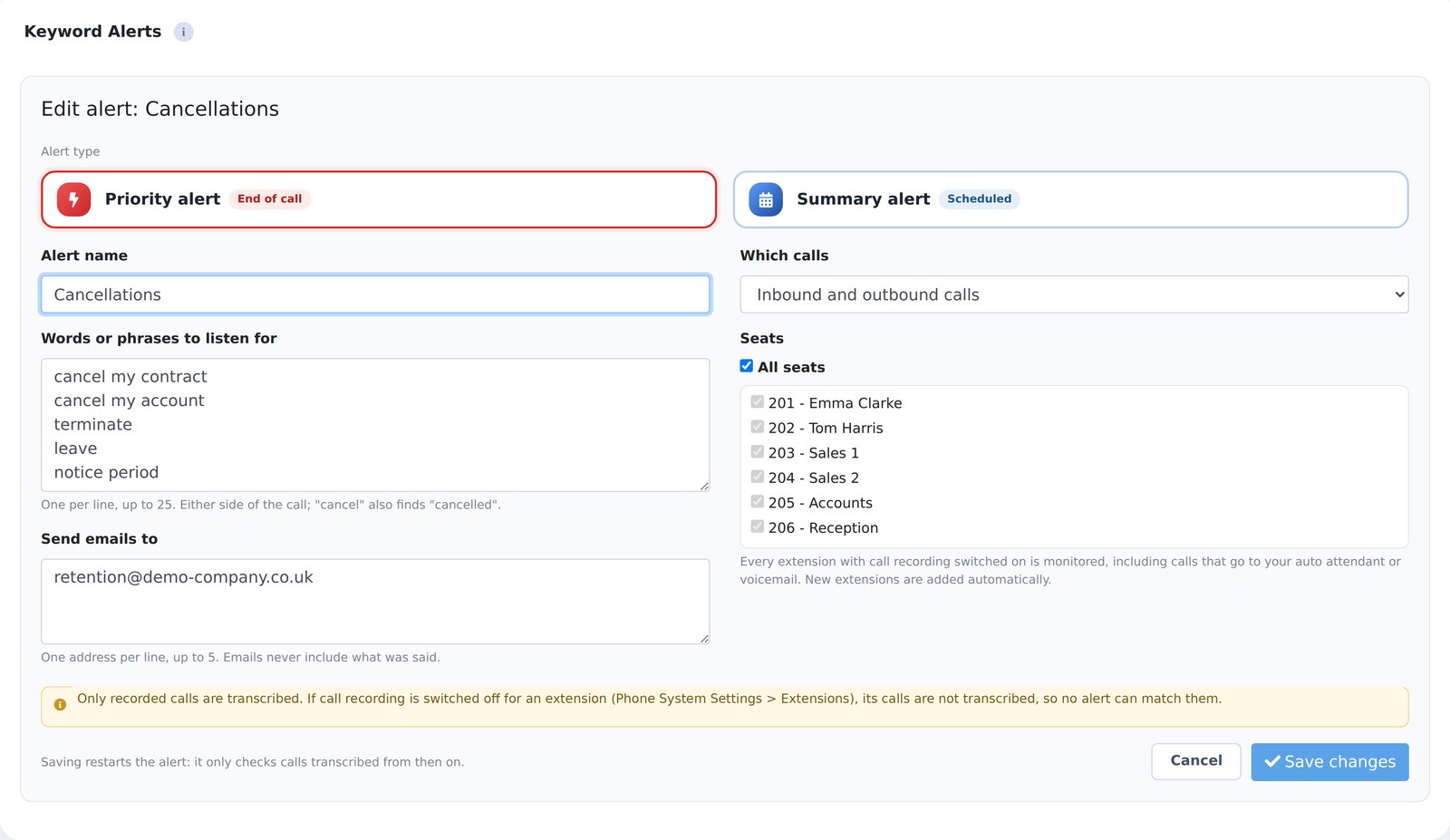
You tell the system which words matter: cancellations, competitor names, complaints, a product you are launching. A Priority alert emails shortly after a matching call ends; a Summary alert sends a digest on the schedule you set. Up to 20 alerts, 25 words or phrases each, on the extensions you pick.
 123
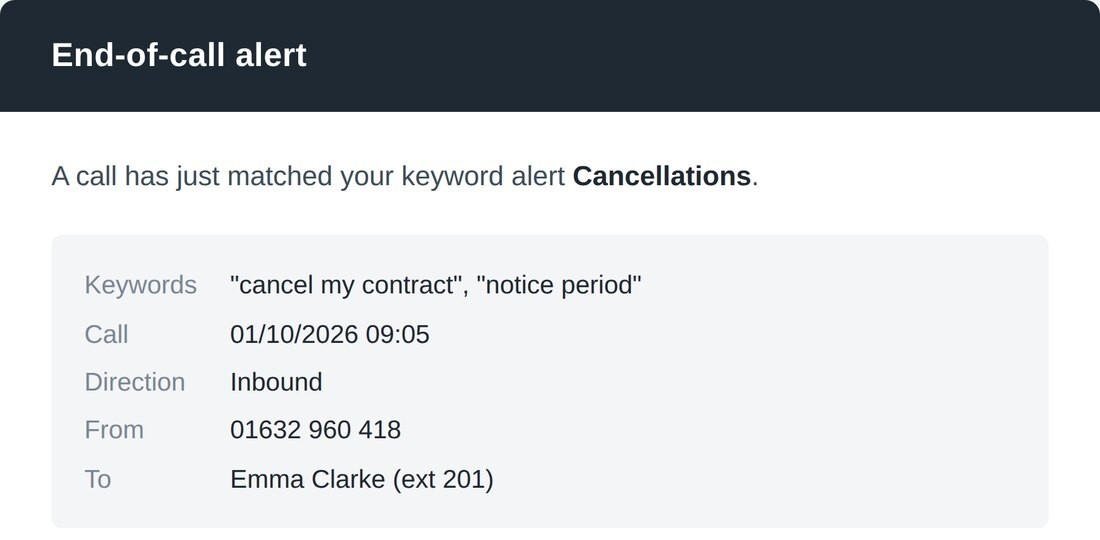
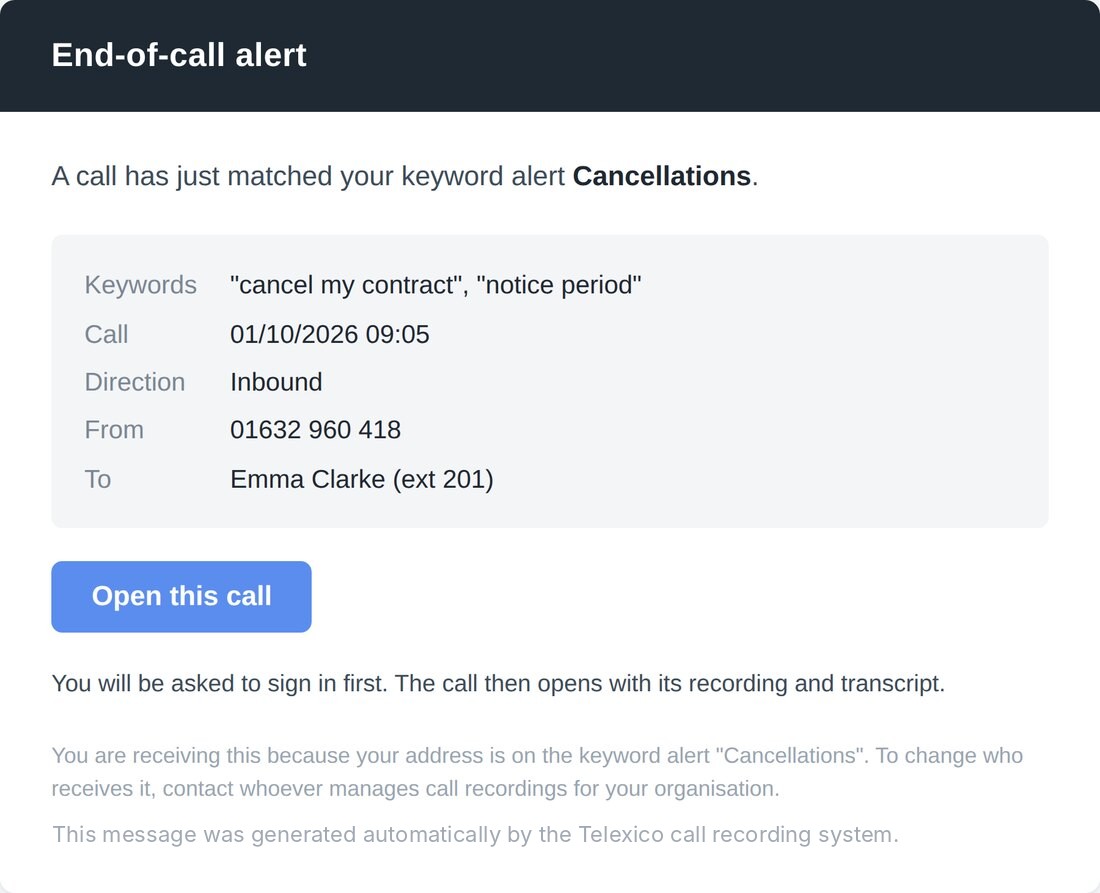
123- 1Which words matched, on which call
- 2One click to the recording and transcript
- 3Sign-in required; no transcript text in the email
The email lands, without the words spoken
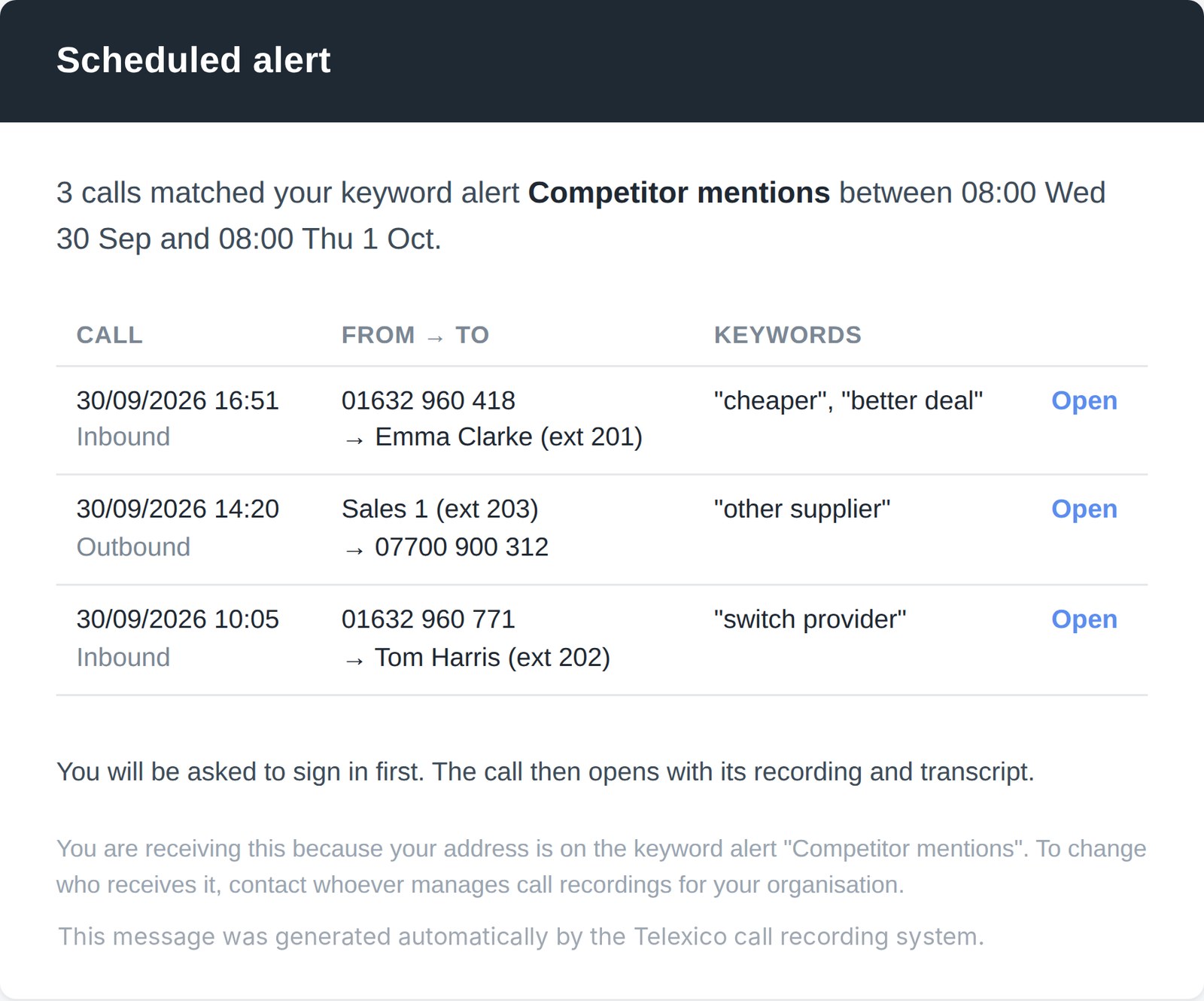
Someone knows within minutes: the alert name, the matched words, the time, direction, caller and extension, and a button to open the call with its recording and transcript. Never the sentences the customer said, so it is safe for a shared inbox.
Steps advance on their own; click any step to stop and explore.
Three things, working together.
Full transcripts
Every call written out in full, agent and caller on separate lines, with a clickable timestamp on each line that plays that moment. Talk-time split, speaker timeline, searchable, copy or download as text.
AI call summaries
A few lines capturing the gist, with the people, companies, products and dates pulled out — call-backs and deadlines flagged, spoken emails and numbers transcribed. Scan a day’s calls in minutes.
Search & keyword alerts
Search by the words actually spoken across every call, then set alerts that email you automatically — the instant a flagged word is said, or as a scheduled digest. The calls that matter come to you.
Every call, written down.
- Transcript, summary and keywords on every recorded call
- Alerts emailed when a caller mentions a complaint, a cancellation or a competitor
- Search every conversation by name, number or word
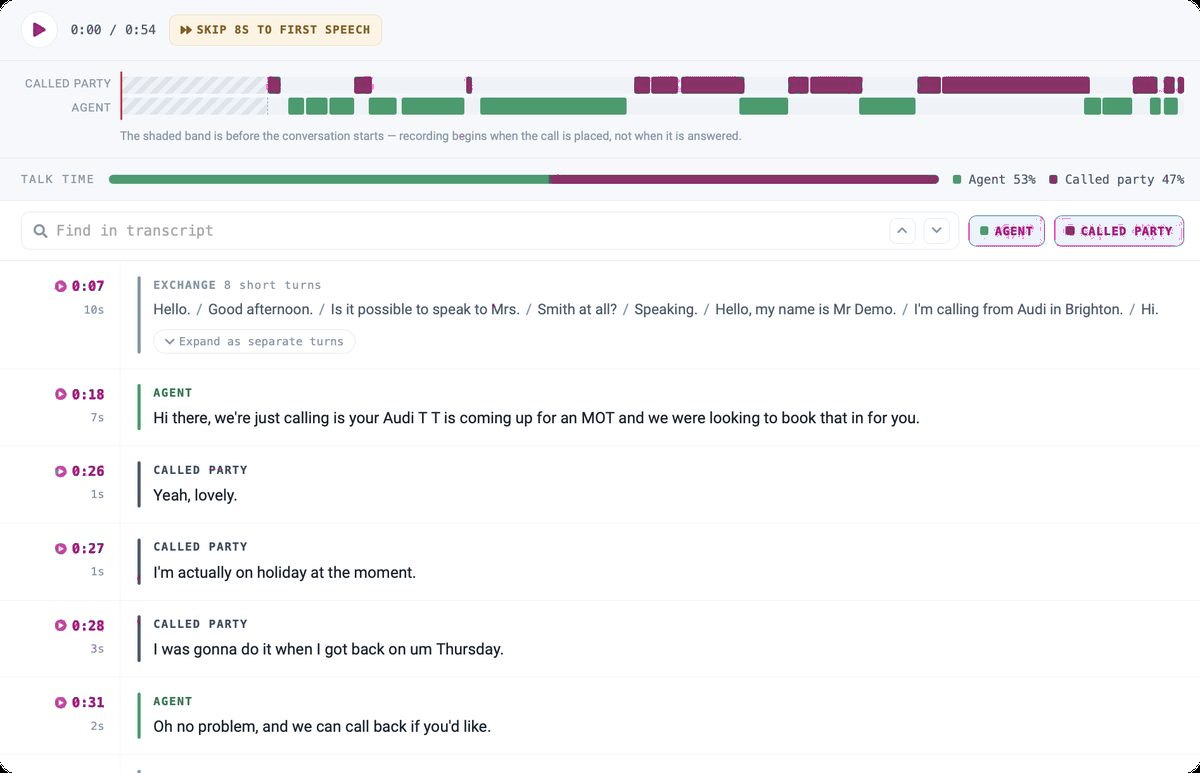
Read a call in thirty seconds, not eight minutes.
Every recorded call becomes a clean, readable transcript. You see exactly who said what, when — and you can jump straight to any moment without scrubbing through audio.
It’s the difference between “I think the customer mentioned a refund” and reading the exact line, at the exact second, with one click.
Lines from the demo call shown above; the summary picked out “Thursday” as the call-back date.
Speaker-labelled
Agent or Caller on separate lines — the called party on outbound calls — so the back-and-forth is instantly clear.
Click-to-play timestamps
Every line is timestamped; click it to hear that exact point in the recording.
Talk-time split & timeline
See who spoke most and how the conversation flowed on a simple speaker timeline.
Searchable · copy & download
Search within any call, and copy or download the transcript as text. Clearly marked AI-generated, with the original recording always there to verify against.
The gist, without the small talk.
Every transcript opens with a few-line summary — and the details that matter are lifted out automatically, so a manager can read a day’s calls instead of listening to them.
People
Who was named on the call.
Organisations
Companies mentioned in the conversation.
Products & vehicles
What was discussed, asked for or quoted.
Dates & times
Call-backs and deadlines agreed, highlighted.
Spoken email addresses and numbers are transcribed too — so the address a customer reeled off is captured, not lost.
Find the call you half-remember.
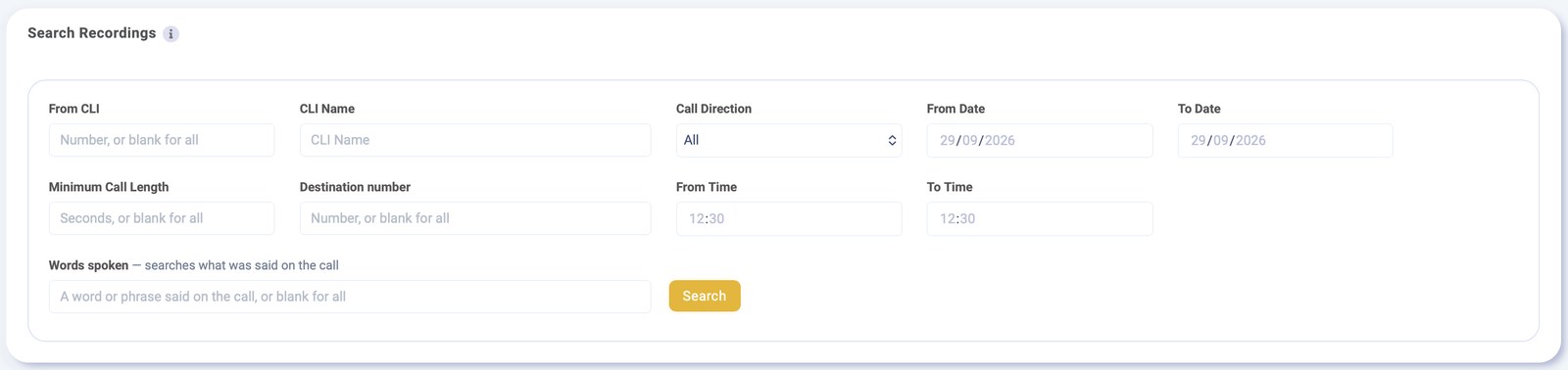
A “Words spoken” field is added to call search in your Telexico portal. Type what you remember — a phrase, a person’s name, an order number, a product — and every call where it was said comes back, each jumping straight to the moment in the transcript.
Combine it with the filters you already use: number, direction, date, time and call length. “Every outbound call last week where someone said cancel” is now one search.
Be told the moment it’s said.
Priority alerts — end of call
An email shortly after a matching call ends. For the words you can’t miss — “cancel”, “complaint”, “urgent”, “solicitor”, “leaving”. Someone knows within minutes, while there’s still time to act.
Summary alerts — scheduled
One digest of every matching call per period: every hour, every 3, 6 or 12 hours, daily, weekly or monthly. Daily at 08:00, weekly Monday 08:00, monthly the 1st at 08:00. Nothing is sent if there were no matches.
Safe for a shared inbox. An alert email gives you the alert name, the matched words, the call time, direction, caller and extension, and a link to the call in your portal — but never the words spoken on the call. You learn a flagged call happened without a single customer sentence leaking into the email.
It’s already part of your phone system.
| The question | The honest answer |
|---|---|
| Where does it live? | In your Telexico portal, under Call Records → Call Recordings, right next to each recording. No separate app, no second login. |
| What do we install? | Nothing. It works from the recordings your phone system already makes. We switch it on per extension. |
| Which calls get transcribed? | Only recorded calls — so the extensions you want covered need call recording enabled. Newly transcribed calls are the ones alerts and search then work across. |
| Who gets it? | Only the extensions you choose — a sales team, a complaints line, or the whole company. Your call. |
| How is it priced? | Per extension, per month, on a rolling 30-day term, with lower rates as you grow. Add and remove people as you need to. |
| Is it a legal record? | No. Transcripts are AI-generated and clearly marked as such — brilliant for reading, searching and coaching; the recording stays the source of truth for anything contractual. |
Not on a Telexico phone system yet? We can move you across and keep your numbers — transcription comes as part of the stack. Start with a free trial and see it on your own calls.
The calls you’d otherwise never hear about.
Stop a customer leaving
An alert on “cancel” or “unhappy” lands before they’ve hung their coat up — not three weeks later in the churn report.
Spot demand you’re missing
Twelve callers a week asking for a product you don’t stock? A summary alert tells you — a buying decision on evidence, not a hunch.
Coach from real calls
Managers read summaries instead of replaying hours of audio. Train from what your best agent actually said.
Settle “who said what”
Disputes end quickly when the transcript — and the recording behind it — show exactly what was agreed.
Hear price & competitor pressure
Track when a rival or “too expensive” comes up, and in what context — a quiet, honest read on where you stand.
Catch growth opportunities
The expansion or upsell a caller hinted at is still in the transcript. Search for buying language and work the calls your pipeline forgot.
Talk in Telexico Web UC. Keep the record with AI.
Telexico Web UC is Telexico’s browser softphone — your full business extension inside a tab, with calling, transfers, conferencing, team chat, a live directory and call notes. No downloads, no passwords.
Run Telexico Web UC for the live conversation and AI Call Transcription for the record of it: your team talks, transfers and takes notes in the browser, and every call comes back written down, summarised and searchable. One system, talking and documenting together.
Explore Telexico Web UC →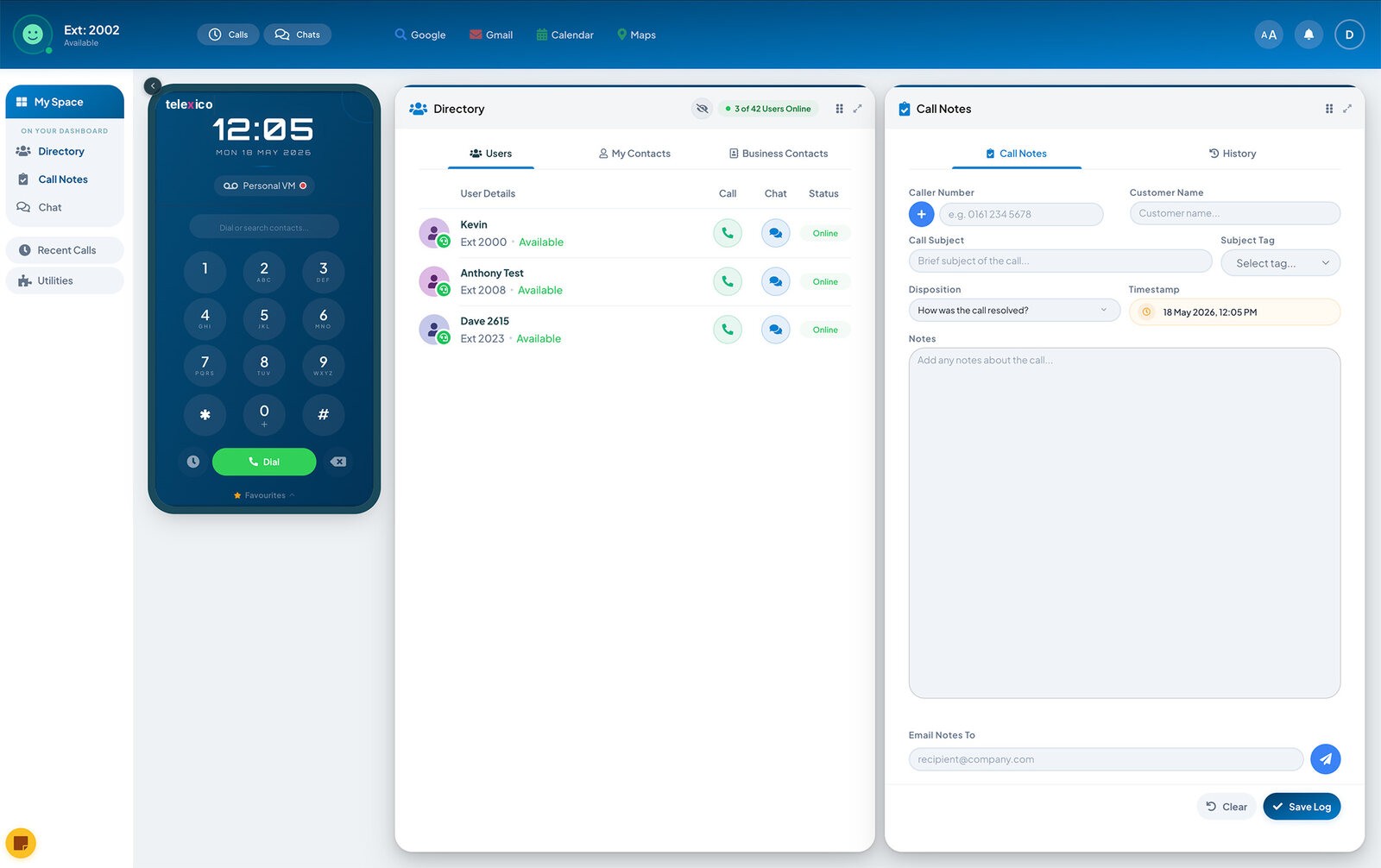
Try it on your own calls, free.
How it’s priced
- Per extension, per month — pay only for the people who need it
- Rolling 30-day term — add or remove extensions whenever you like
- Lower rates as you grow — the more extensions, the better the rate
- Quoted against your actual setup — no guesswork
We’ll switch transcription on for a free trial — up to 2 months free for new and existing Telexico cloud phone system users — on the extensions you choose. See your own conversations transcribed, summarised and searchable, and try the alerts, before you commit a penny.
Prefer to read first? Download our brochure — 26 pages on phones, fibre, failover, WiFi, AI and security under one UK team.
Good for business, not just for listening.
A few of the alerts our customers set up. Each one is just a list of words, who to tell, and how soon.
Stop a customer leaving
Shortly after a customer says they want to go, your retention team gets an email with the call details and a link to the call.
Products you don’t stock
Every Monday, purchasing gets one email listing the calls where customers asked for something you could not supply.
Customer service training
Team leaders get a daily list of difficult calls, each one a click away from its transcript and recording.
Faults and urgent issues
Support is emailed shortly after the call ends, even if the person who took it did not raise a ticket.
Competitor mentions
Sales managers get a daily list of calls where customers talked about price or another supplier, and which extension took them.
Sales opportunities
Account managers get a regular round-up of customers who mentioned growing or changing.
Everything else it does.
Skip to first speech
Recording starts when the call is placed, not when it is answered. One click skips the ringing and lands on the first word.
“cancel” also finds “cancelled”
Up to 25 words or phrases per alert, each up to 8 words, heard on either side of the call. Word forms are matched, so one entry catches the variants.
Edit, pause or delete any alert
Pausing keeps the settings. An alert only checks calls transcribed after it was last saved, and calls transcribed while it is paused are not checked, so nothing fires retrospectively.
Ninety days of history
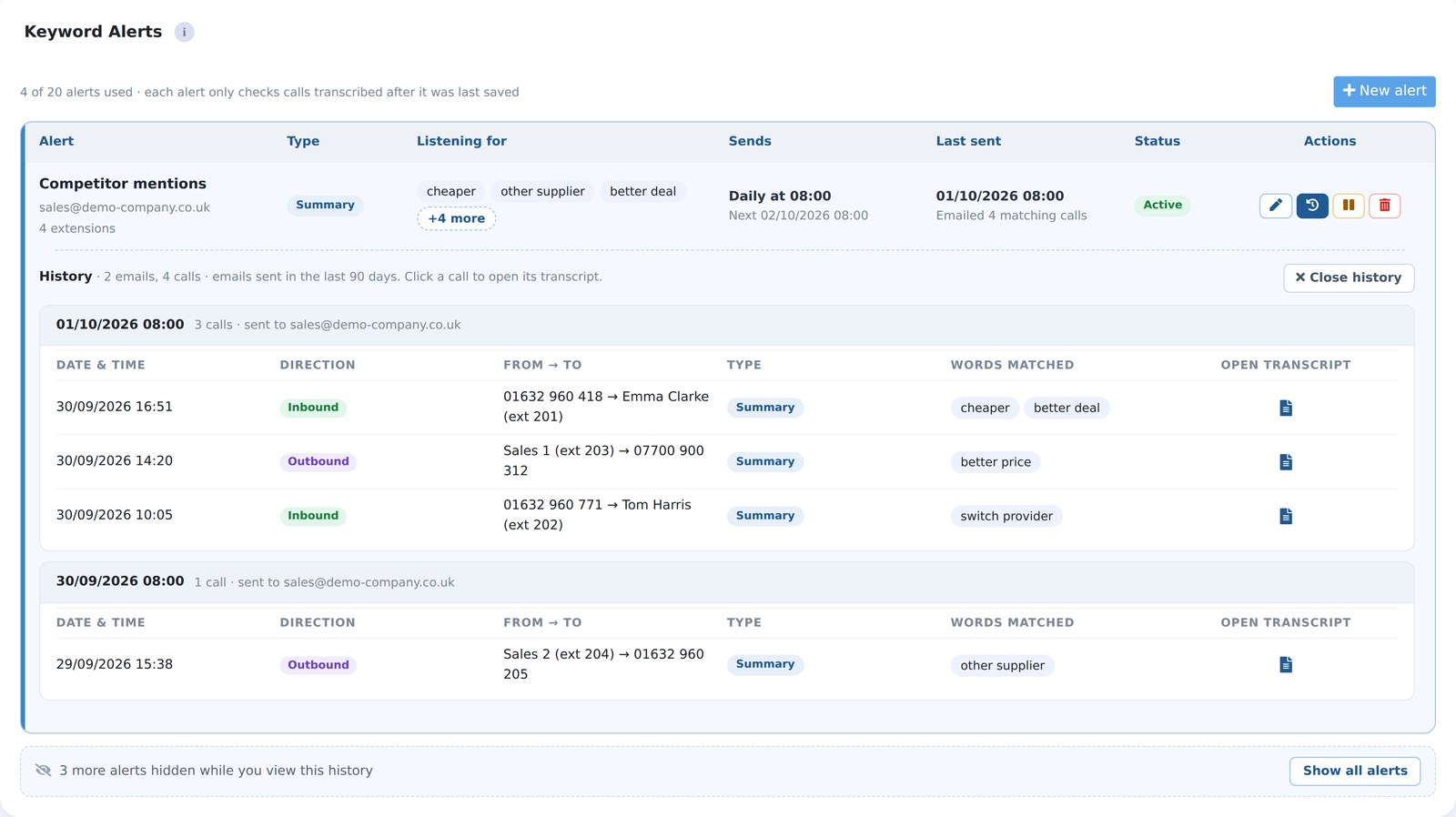
Every alert email from the last 90 days is listed against the alert, with one click to each matched call’s transcript.
One screen for every alert
Priority and summary alerts sit together in the Call Recordings area, with the words each listens for, who it emails, when it last sent and whether it is active or paused.
Sign in to open a call
The link in every email opens the call with its recording and transcript, after signing in to your portal. Nothing sensitive travels in the email itself.
Useful for every team that picks up the phone.
Customer service
Cancellation and complaint calls reach the right people the same day, while there is still time to save the customer.
Sales and bookings
Dates, call-backs and products agreed on the call are picked out, so nothing gets missed.
Managers and training
Read summaries instead of listening back, and use real calls to show new starters what good looks like.
Compliance
Find the exact moment something was said and settle “who said what” questions in seconds.
Every call, written down.
AI call transcription, answered.
What is AI call transcription?
It turns each recorded business call into written text you can read, search and act on. Telexico’s version labels who said what, timestamps every line so you can click to play that moment, writes a short summary, and lets you search across every call by the words actually spoken — all from the recordings your Telexico cloud phone system already makes.
Is there a free trial?
Yes — up to 2 months free for new and existing Telexico cloud phone system users. We switch transcription on for a trial on your own real calls, so you see your own conversations transcribed, summarised and searchable before you commit.
Do I need to install anything?
No. If your calls are on a Telexico cloud phone system, it’s switched on per extension and appears in your portal next to each recording. No app, no desk-phone change, no software on anyone’s computer. Only recorded calls are transcribed, so the extensions you want covered need call recording enabled.
How are the transcripts laid out?
Speaker-labelled — Agent or Caller (the called party on outbound calls) — with a clickable timestamp on every line that plays that point in the recording. You get a speaker timeline, a talk-time split, full in-call search, and the option to copy or download the transcript as text.
What does the AI summary include?
A few lines capturing the gist, with the people, organisations, products and vehicles, and any dates and times — call-backs and deadlines — pulled out. Spoken email addresses and numbers are transcribed so nothing important is lost.
How accurate are the transcripts?
They’re AI-generated from the call audio — good enough to read, search and act on, but not a legal record. Every transcript is clearly marked as AI-generated, and the original recording is always there to verify against. Accents, crosstalk and poor lines can produce the odd wrong word.
Can I search across every call?
Yes — a “Words spoken” field is added to call search in your portal. Type a phrase, a name, an order number or a product and you get every call where it was said. Combine it with number, direction, date, time and call-length filters.
What are keyword alerts and what are the limits?
Emails that fire when chosen words are spoken. Up to 20 alerts per account, each watching up to 25 words or phrases (up to 8 words each), to up to 5 email addresses, on the extensions you pick — inbound, outbound or both. A Priority alert sends shortly after a matching call ends; a Summary alert sends a scheduled digest (every hour, 3, 6 or 12 hours, daily, weekly or monthly).
Do the alert emails include what was said?
No — by design. An alert gives the alert name, matched words, call time, direction, caller and extension, and a link to the call in your portal — but never the words spoken. That keeps it safe for a shared inbox. Summary alerts send nothing at all when there were no matches.
How much does it cost?
Per extension, per month, on a rolling 30-day term, with lower rates as you grow. We quote it against your actual extensions — call us or ask your account manager, or just start with a free trial.
Can I pair it with Telexico Web UC?
Yes. Telexico Web UC is Telexico’s browser softphone — your full extension in a tab, with calling, team chat, directory and call notes. Run Telexico Web UC for the live conversation and AI transcription for the record of it, and your team both talks and documents from one place. Both are part of the Telexico cloud phone stack.
Stop guessing what your calls say.
Tell us which lines you want to hear about — sales, complaints, a product — and we’ll set up a free trial on those extensions and build the alerts with you. Priced per extension, on a 30-day term.
Or call 01902 427 427 — Wolverhampton HQ, real people.