Common business WiFi problems.
Most UK business WiFi problems trace back to a small number of root causes — coverage gaps, channel interference, undersized APs, congested guest traffic. Practical diagnostic guide to common business WiFi issues and what actually fixes them.


What we hear every week.
The frustrations behind why businesses search for common business wifi problems in the first place. If any of these feel familiar, the fix is straightforward.
Dead zones in parts of the premises
Customers complain WiFi doesn't work in the back room; staff find video calls drop in particular areas. Coverage gaps from undersized AP deployment or signal-blocking building materials.
Connections that keep dropping
Devices connect, work briefly, drop, reconnect. Usually channel interference, AP overload, or roaming issues between APs.
WiFi 'works' but everything is slow
Connection is fine on speed test but apps stutter, video calls freeze, file uploads crawl. Usually undersized AP for user density, or guest traffic eating corporate bandwidth.
Guest WiFi causing performance and security problems
Guest traffic on the same network as business systems slows EPOS, accounts, staff devices — and creates real security risk.
Common business WiFi problems and what fixes them
**Problem 1 — coverage gaps:** dead zones in particular areas. **Cause:** undersized AP count, signal-blocking materials (brick, steel, concrete), inappropriate AP placement. **Fix:** site survey, add APs at planned positions, consider higher-power APs for difficult zones, wired backhaul. **Problem 2 — dropping connections:** devices connect and disconnect repeatedly. **Cause:** channel interference (nearby WiFi networks on same channel), AP overload (too many devices on one AP), roaming issues between APs. **Fix:** central controller with automatic channel selection, more APs to distribute load, properly tuned roaming protocols (802.11r/k/v). **Problem 3 — slow despite good signal:** speed tests fine, real applications stutter. **Cause:** undersized APs for user density, congested guest traffic competing with corporate, insufficient backhaul. **Fix:** business-grade APs sized for actual user count, VLAN segregation, wired backhaul not mesh. **Problem 4 — guest WiFi mixed with business:** guests on the same network as EPOS and accounts. **Cause:** consumer-grade setup without VLAN segregation. **Fix:** proper VLAN configuration on the managed router, separate guest SSID with bandwidth shaping, captive portal for guests.
WiFi you never think about.
- Designed from a survey, not a guess
- Guest and staff networks kept apart
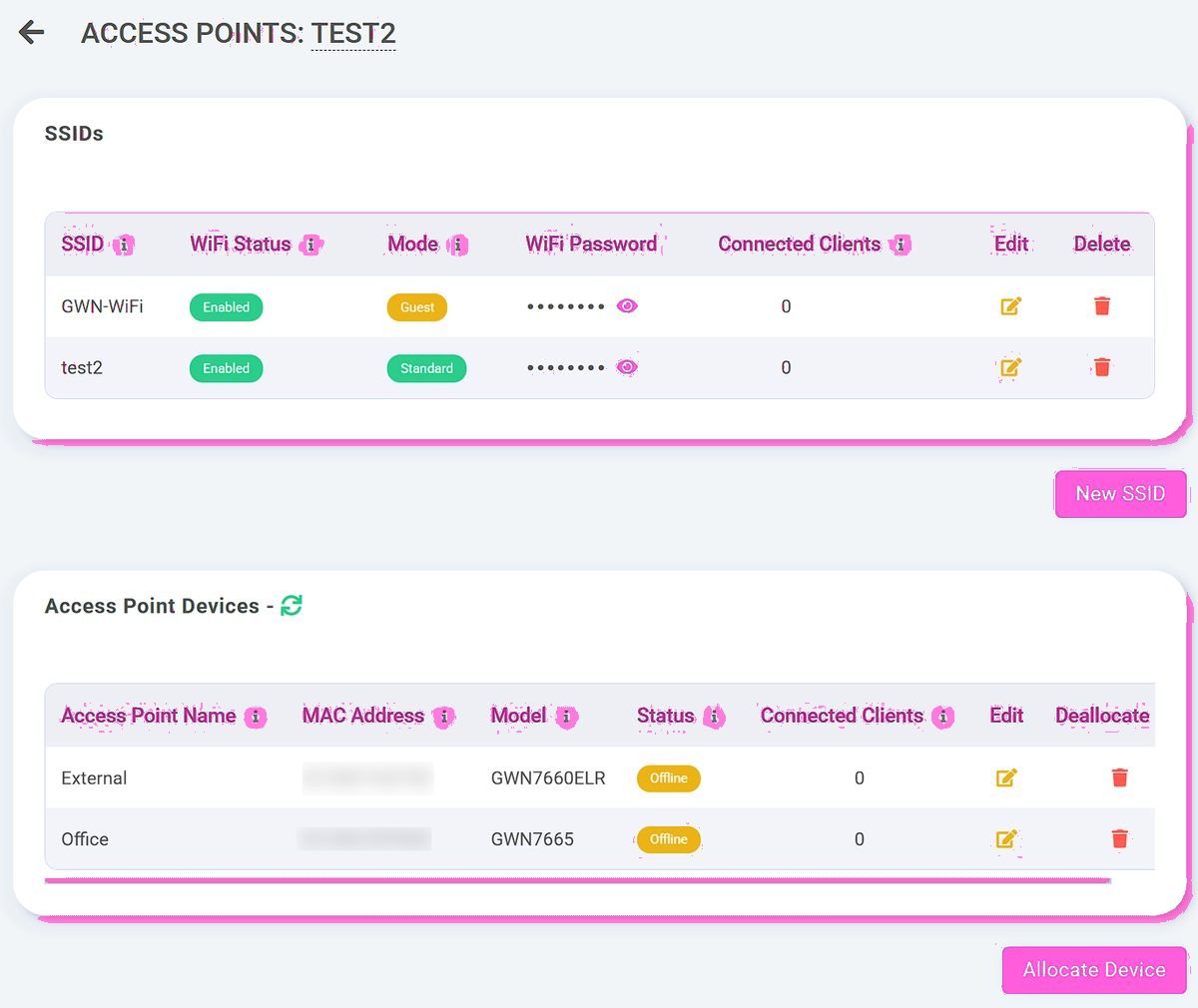
- Managed from the Telexico portal
The Telexico approach to common business wifi problems.
Six things our customers consistently tell us matter.
Site survey identifies root causes
Coverage modelling shows where the gaps are; signal-strength measurement confirms in-building reality; channel scan identifies interference.
Business-grade APs handle real density
Properly-sized APs for actual user count — not undersized consumer kit straining at SME load.
Central controller for consistency
All APs managed as one system — channel optimisation, roaming protocols, firmware consistency. Fixes most channel-interference issues.
VLAN segregation
Corporate, guest, EPOS, IoT, CCTV — separated where appropriate. Performance protected; security protected.
Wired backhaul wherever possible
CAT6 from each AP to switch — significantly better than mesh for performance and reliability.
Ongoing monitoring
Telexico monitors AP health, client count, channel utilisation — issues caught before users notice.
Built around real UK premises
Different premises produce different WiFi problems. Victorian office conversions: thick walls cause coverage gaps. Open-plan modern offices: channel interference between adjacent APs. Hospitality with guest WiFi: guest abuse and segregation issues. Multi-floor buildings: roaming between APs as staff move. We diagnose around the specific premises rather than applying generic fixes.
How it works for businesses like yours.
Three real-world setups we deliver across the UK.
Offices with dead zones and dropping connections
Coverage modelling, AP redeployment, controller-based channel optimisation, wired backhaul — fixes the underlying problems.
Hospitality with mixed guest/business WiFi
Separate VLANs, captive portal for guests, bandwidth shaping, proper AP placement for both customer and staff coverage.
Warehouses with scanner connection drops
Industrial-grade APs handling steel racking, proper roaming protocols for scanner mobility, mesh where cabling isn't feasible.
Why this diagnostic guide comes from Telexico
Telexico diagnoses and fixes business WiFi problems across UK premises every week — offices, retail, hospitality, warehouses, healthcare. Wolverhampton-headquartered. Site survey, root-cause analysis, proper fix — not endless AP-adding without solving the underlying issue.
What you actually get from Telexico.
Honest about scope. No aggressive sales tactics, no surprise renewal jumps, no tier-1 call-centre triage. Real UK engineers, transparent pricing, one provider relationship across the stack.
UK-based provider
Wolverhampton-headquartered. Engineers cover the West Midlands daily; UK-wide install via our partner network. Real UK engineer support, UK data residency, UK contractual relationship — not US-routed SaaS.
Real engineer support
When you call Telexico, you reach someone who can actually fix things. Response SLA backed by real engineering capacity rather than call-centre headcount. Named account manager for ongoing customers.
Free infrastructure review
Every engagement starts with a no-obligation audit of your current setup. Honest recommendation — sometimes that's "stay with your current provider after negotiation." We'd rather be honest than oversell.
Transparent pricing
What you sign for is what you pay — including renewal. No teaser pricing that jumps 30-100% at year two. No mid-contract CPI shock. Predictable multi-year cost from day one.
One provider, one platform
Broadband, hosted VoIP, business WiFi, AI Receptionist, 4G/5G failover, CCTV consolidated onto one Telexico relationship. Single bill, single support number, single engineer when something needs attention.
Migration project-managed
Switching to Telexico isn't DIY. We handle contract audit, notice timing, ordering, parallel running, cutover, old-provider close-out. Customer-visible disruption typically measured in minutes.
Tailored around your business.
Tell us what you have now and what's frustrating you. We'll come back with a tailored review of where we can simplify, consolidate or improve it — no fixed-package pressure, no hard sell.
You may also want to read
What is Starlink for business
Starlink Business is SpaceX's commercial-grade satellite internet service for businesses. It uses a constellation of...
Leased line vs full fibre
Full fibre (FTTP) and leased lines are both fibre-optic business connectivity, but they're fundamentally different...
Openreach vs CityFibre
Most UK business broadband is delivered over one of two main fibre networks: Openreach (BT-owned, the incumbent, covers...
Business Broadband cost
Indicative UK pricing for business broadband — what affects the price, ranges, and a free tailored review.
Leased Lines cost
Indicative UK pricing for leased lines — what affects the price, ranges, and a free tailored review.
Free infrastructure review
Send us your current setup. We'll review what you have, what you pay, and where we can simplify.
WiFi designed, not hoped for.
Frequently asked questions
Why doesn't my office WiFi reach the back room?
Usually coverage gap — signal can't penetrate the building materials (brick walls, steel, concrete, fire doors) from where the AP is placed. Fix: add an AP in the affected area with proper cabling, or higher-power AP at the existing location if survey confirms it'll work. Mesh as last resort if cabling isn't feasible.
Why do video calls keep dropping on WiFi?
Usually AP overload (too many devices on one AP), channel interference, or roaming issues if you're moving. Fix: more APs to distribute load, central controller for channel optimisation, properly tuned roaming protocols (802.11r/k/v) for smooth handoff.
WiFi speed test shows good speeds but everything's slow — why?
Speed test measures bandwidth to the internet; doesn't measure real-world application performance. Common causes: congested guest WiFi traffic competing with business apps, undersized AP for user density, insufficient backhaul cable, or QoS not configured for voice/video. Fix: VLAN segregation, properly-sized APs, wired backhaul, QoS on managed router.
Why does my guest WiFi slow down the EPOS?
If they're on the same network, guest traffic competes with business systems for bandwidth. Fix: VLAN segregation — guest WiFi on a separate logical network with bandwidth shaping, EPOS on its own VLAN with priority. Standard for any business with guest WiFi and operational systems.
My WiFi worked fine when we had 5 staff; now we have 25 it's struggling — what changed?
AP capacity. APs have practical limits on simultaneous active connections — typical SME-grade business AP handles 30-50 concurrent active devices well; consumer kit much less. Adding staff and devices crosses the capacity threshold. Fix: more APs and/or higher-capacity business-grade APs.
Should I get my IT support person to fix WiFi or use a specialist?
Depends on the complexity. Small office WiFi: an IT contractor can usually handle it. Multi-floor or larger premises, guest WiFi separation, performance issues, controller-managed deployments: specialist WiFi expertise pays off. Telexico's WiFi engineers handle both as part of the managed infrastructure stack.
How much should fixing business WiFi properly cost?
Depends on the scope. Small office WiFi rebuild: £500-3,000 plus APs. Larger premises: scales with AP count. Often the cost of a proper redesign is similar to ongoing operational cost of bad WiFi (staff time, lost productivity, customer complaints) over 12 months.
Apply this to your business?
Reading the guide is one thing; applying it to your specific operation is another. Send us your current setup — we'll review what you have, what fits, and where to start. No hard sell, no fixed-package pressure.